

Visitors now expect websites to answer questions quickly, surface useful information, and work smoothly on every device. WordPress can do more than publish pages: with carefully chosen artificial intelligence (AI) and machine learning (ML) features, it can help teams improve search, support, content workflows, and moderation.
This Endexer guide explains what AI can do inside WordPress, practical ways to add it, and how to protect speed, privacy, and accuracy while you experiment.
Table of Contents
- WordPress and AI: what has changed
- Where AI can improve a WordPress site
- Practical integration methods
- Benefits and common challenges
- A safe rollout checklist
- The future of AI-powered WordPress
- Frequently asked questions
WordPress and AI: what has changed
WordPress has grown from a publishing tool into a flexible platform for business websites, online stores, communities, and service portals. Plugins and APIs now make it possible to connect AI features without rebuilding a site from scratch. Machine learning is one branch of AI: it learns patterns from examples to classify information or make predictions. In everyday WordPress use, the two terms often describe features such as recommendations, automated tagging, or conversational help.
AI is most useful when it supports a clear task. It can help visitors find an answer or help a team handle repeated work. It should not be added just because a feature is new; every integration needs a purpose, an owner, and a way to check whether it works.
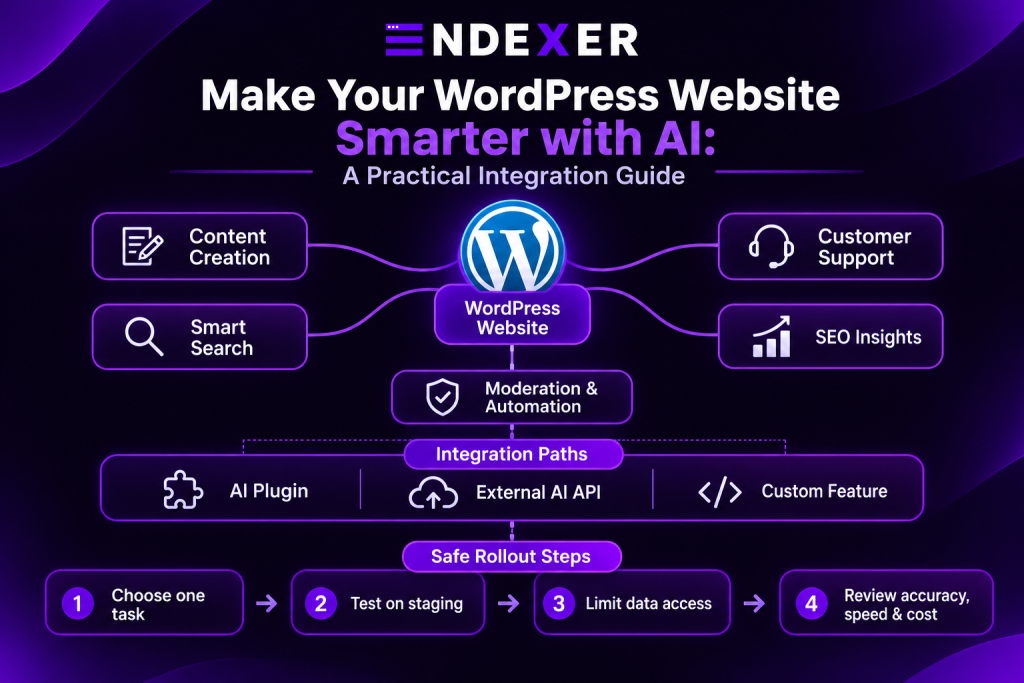
Where AI can improve a WordPress site
1. Content creation and editing
Writing assistants can help brainstorm outlines, summarize long pages, suggest clearer headings, or prepare a first draft. Editors should verify facts, links, product details, and technical instructions before anything goes live. Use AI to support the editorial process while keeping a person responsible for the final content.
2. Search and content discovery
Smarter search can recognize related phrases and guide visitors to useful pages even when their wording does not exactly match a title. Recommendations can also connect a reader to related guides or products. Start with relevant categories and reviewed content; use behavioral personalization only when it is useful and explained clearly.
3. Customer support chat
A site assistant can answer common questions using approved help pages and product information. Give it a narrow scope, make source links visible, and provide a clear route to a human when it cannot answer confidently. Keep account, payment, and other sensitive requests outside an unverified bot workflow.
4. SEO and content insights
AI tools can surface missing topics, suggest metadata improvements, group related search queries, and speed up routine audits. Treat these suggestions as a starting point. Review search intent, avoid repeating keywords unnaturally, and make sure each page gives readers accurate information that is genuinely useful.
5. Moderation and routine administration
Classification tools can help flag likely spam, sort incoming requests, label images, or organize content. Send uncertain cases to a person for review and keep a record of what the automation changes. This makes routine work faster without giving an automated system unchecked control over public content.
Practical ways to integrate AI into WordPress
Use a maintained plugin
For a common need, a plugin may be the quickest route. Before installing one, review its update history, compatibility, support, permissions, pricing, and data policy. Check whether it connects to a service, what information it sends, and where its settings are stored. Test it on a staging copy first.
Connect an external AI service
An API connection can provide more control over a chatbot, search experience, or internal workflow. Plan the data flow before connecting anything: send only what the feature needs, protect credentials in server-side settings, set usage limits where available, and log failures without exposing private information.
Build a focused custom feature
A custom integration can fit a particular business process, but it brings ongoing work: updates, testing, monitoring, and model changes. Document how the feature behaves, who maintains it, and how to switch it off if results are inaccurate or costs rise.
Benefits and common challenges
A well-chosen integration can make information easier to find, reduce repetitive tasks, and help a small team respond more consistently. These outcomes depend on the quality of the setup and the information behind it; they are not automatic. Track a simple baseline, such as successful searches, resolved support questions, or time spent on a repeat task.
Accuracy
AI can produce a confident answer that is wrong or out of date. Limit responses to reviewed sources, test difficult examples, show uncertainty, and retain a human review step for important decisions.
Privacy and security
Understand what information a plugin collects, where it is processed, how long it is retained, and whether it may be used to improve a provider’s models. Keep software and credentials updated, grant only necessary access, and avoid sending customer secrets or payment data.
Performance and cost
Extra scripts and external requests can affect load times, while API usage and subscriptions can increase costs. Measure performance on mobile, set spending or usage limits, and remove features that do not provide enough value.
A safe rollout checklist
- Choose one visitor or team problem to solve.
- Define a measurable result before installing anything.
- Check plugin maintenance, compatibility, permissions, and data practices.
- Test on staging and keep a backup or rollback path.
- Share the minimum data required and protect API credentials.
- Try normal questions, edge cases, and cases where the system should abstain.
- Review accuracy, speed, cost, and privacy after launch.
The future of AI-powered WordPress
WordPress tools will continue to add natural-language search, content assistance, and workflow automation. The most dependable sites will pair those capabilities with human judgment: automation can handle repeatable steps, while people remain accountable for accuracy, privacy, and customer care. Start small, learn from real use, and expand only when the evidence supports it.
Frequently asked questions
Can I add AI to WordPress without coding?
Yes. Many plugins offer settings-based tools for chat, writing support, spam filtering, or search. Check their compatibility and data practices before installing them.
Does AI-generated WordPress content need editing?
Yes. Review accuracy, originality, links, tone, and technical details. AI can help prepare a draft, but a person should approve the published version.
Will an AI plugin slow down my site?
It can, depending on how the plugin loads scripts and contacts external services. Compare performance before and after setup, especially on mobile.
What is the safest way to start?
Choose one low-risk task, test on staging, limit data sharing, and keep a human review step. Expand after checking accuracy, privacy, compatibility, and cost.
Conclusion
AI and machine learning can make a WordPress website more useful when each feature addresses a real need. Select a suitable integration, protect visitor information, measure its effect, and keep people accountable for the outcome. With a careful rollout, Endexer site owners can explore smarter websites while keeping the experience helpful and trustworthy.