

Launching a WordPress website can feel like a big project when you are starting with a blank page. An AI website builder can help you turn a short description of your business into a first draft, complete with a suggested layout and starter copy. You can then edit that draft in WordPress so the final site reflects your brand and gives visitors the information they need.
AI is a starting point, not a substitute for your review. Check every page, image, link, and business detail before making the website public.
What to prepare before you start
Gather a few essentials before opening the builder:
- A domain name and a hosting plan that supports WordPress
- Your website or business name and a short description of what you offer
- The audience you want to reach and the action you want visitors to take
- Contact details, brand colors, and a logo if you have one
- A few examples of website styles you like
You do not need to write every page in advance. A clear, specific brief is enough to give the builder a useful direction.
Step 1: Install WordPress
Choose a hosting plan, connect your domain, and install WordPress using your hosting provider’s setup flow. Many hosting dashboards include a guided installer. During setup, choose a strong administrator password and an email address you can access. When installation is complete, sign in to your WordPress dashboard.
The location of an AI builder depends on the tool you choose. It may be available through your hosting dashboard, as a WordPress plugin, or in a separate builder account. Follow the setup instructions provided for that product.
Step 2: Write a useful description
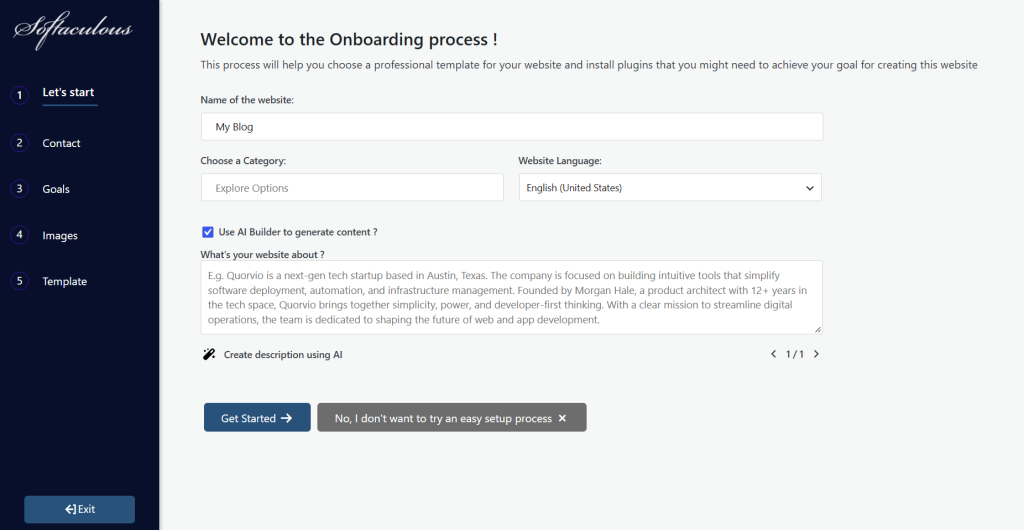
Describe your business in plain language. Include your industry, audience, main service or product, location if it matters, and the most important thing a visitor should do.
For example: “Create a welcoming website for a bicycle repair shop in Pune. Explain our repair services, show our opening hours, and make it easy for customers to request an appointment.” A detailed prompt gives the builder better context than a request for a generic business site.
Avoid sharing private customer information or confidential business details unless you understand how the tool handles that information.
Step 3: Select pages and features
Start with the pages your visitors are most likely to need. A small business website may include Home, About, Services, and Contact. Add a Blog if you plan to publish helpful articles. An online store may need product pages and checkout, while a service business might need a contact form or appointment booking.
Choose features that support a real need. A focused first version is easier to review, update, and maintain.
Step 4: Review the generated design
The builder may suggest a layout, colors, images, and sample wording. Check whether the page order makes sense to a first-time visitor and whether the visual style fits your brand. Replace generic images with visuals you own or have permission to use. Check how the pages look on a phone as well as on a larger screen, and add useful alternative text to images.
Step 5: Edit and verify the content
Read every page carefully. AI-generated copy may sound confident while including details that are inaccurate, invented, or too vague. Correct claims about your products and services, remove placeholder text, and make the next step clear for visitors.
Also check your contact information, page titles, navigation links, forms, and calls to action. Use language your customers will understand, and make sure each page answers a real question.
Step 6: Preview and publish
Preview your site on desktop and mobile. Test buttons, navigation, forms, and any booking or checkout process. Confirm that your site uses HTTPS and that backups and security updates are set up through your hosting or WordPress tools.
When the important details are ready, publish the site and open it in a private browser window to check what visitors will see. Ask someone unfamiliar with the project to find a service or send an inquiry; their experience can reveal confusing labels or missing information.
Step 7: Keep improving your website
After launch, keep your WordPress installation and extensions updated, maintain backups, and refresh information when your business changes. If you add a blog, write about topics that genuinely help your audience and choose a publishing schedule you can maintain.
Frequently asked questions
Do I need coding skills to use an AI website builder?
Usually not for the initial setup. Many builders create a first draft through prompts and guided choices. More advanced changes may depend on your theme, builder, or the help of a developer.
Can I edit the website after it has been generated?
Yes. WordPress sites are generally editable after generation. The available controls depend on the theme and builder you use.
Is an AI-generated website ready to publish immediately?
Review it first. Verify the text, images, links, mobile layout, contact details, and any claims about your business. You are responsible for making sure the published site is accurate and appropriate.
What should I do after the site goes live?
Keep WordPress updated, maintain backups, test forms occasionally, and refresh pages as your services change. Use visitor feedback to guide future improvements.
Final thoughts
An AI website builder can help you move from an idea to a WordPress draft more quickly. Give it a clear brief, choose only the features you need, and review the result carefully. Your edits are what make the finished website accurate, useful, and recognizable as your business.